Your health,
on your machine.

A health dashboard built around a spinnable 3D body. Track your supplements, peptides and medications, your labs, your training and your daily numbers — and watch which parts of you each of them actually touches.

Everything you log resolves to a body system

  • Nervous
  • Cardiovascular
  • Brain
  • Muscular
  • Skeletal
  • Organs
  • Endocrine
  • Immune

Runs on your own computer. No account, no sync, no telemetry. Source included.

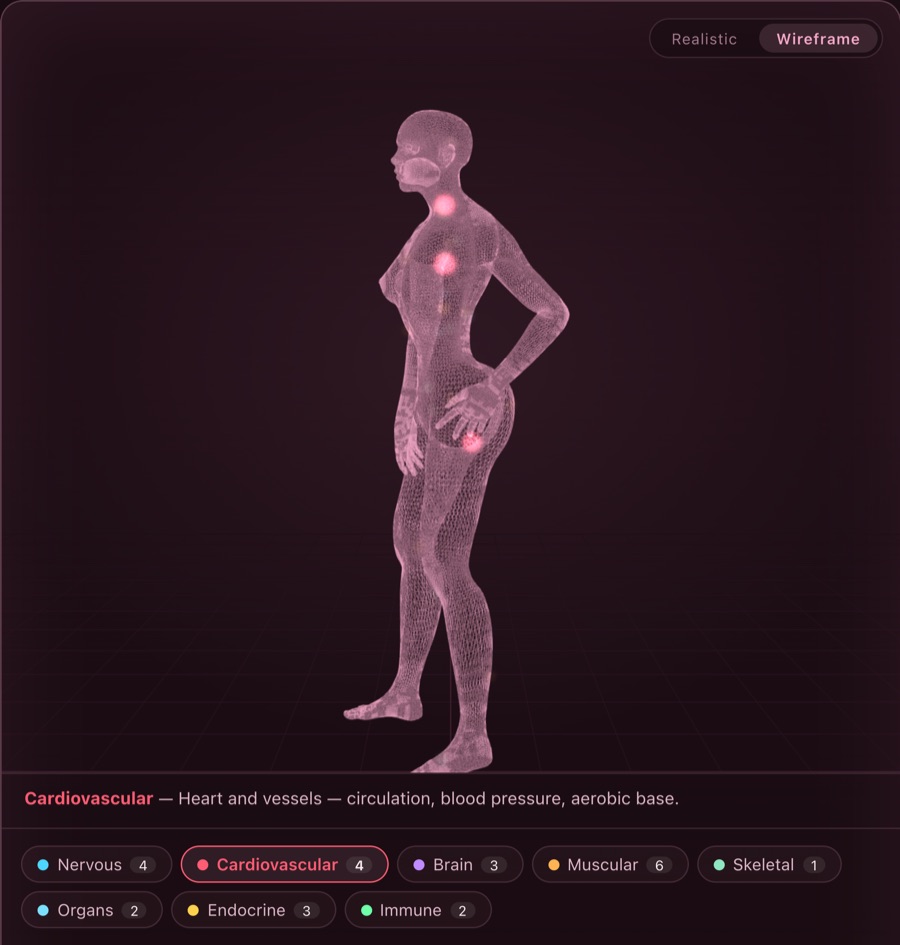
The Corpus 3D body in wireframe mode with the cardiovascular system lit up, above the eight body-system chips.
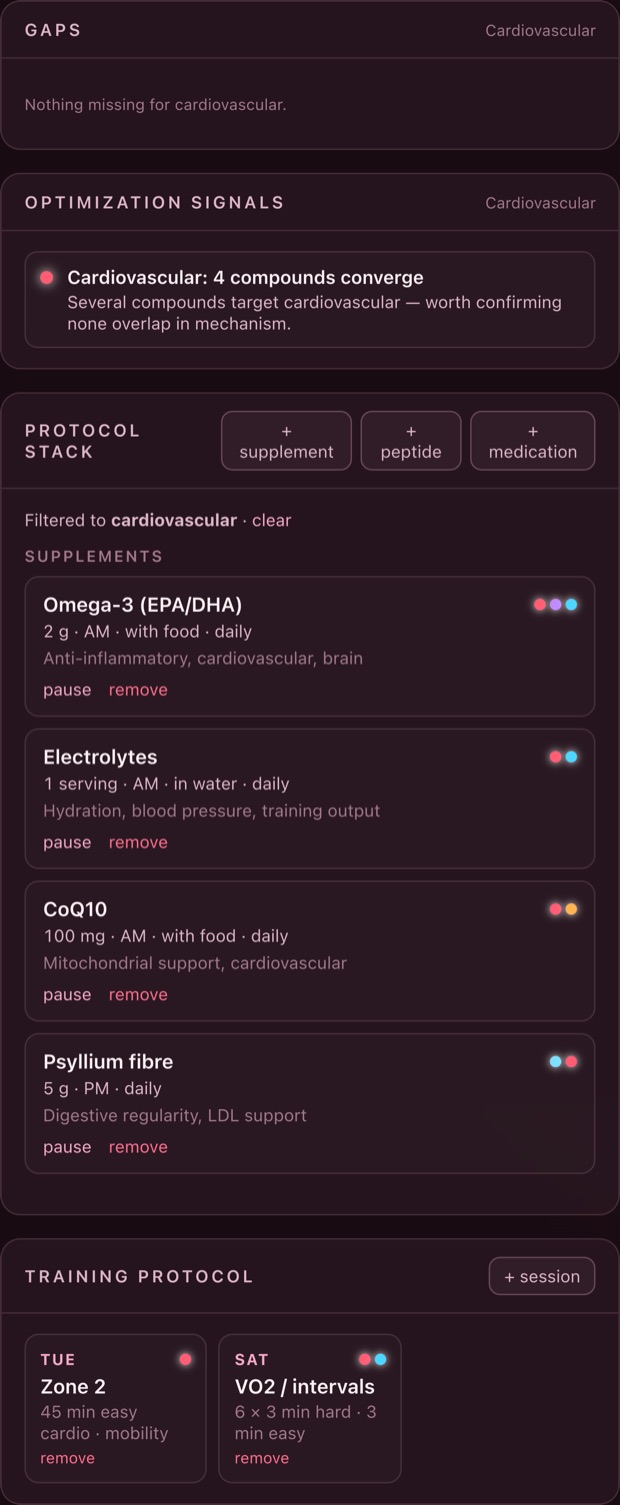
Cardiovascular selected · 4 compounds converge
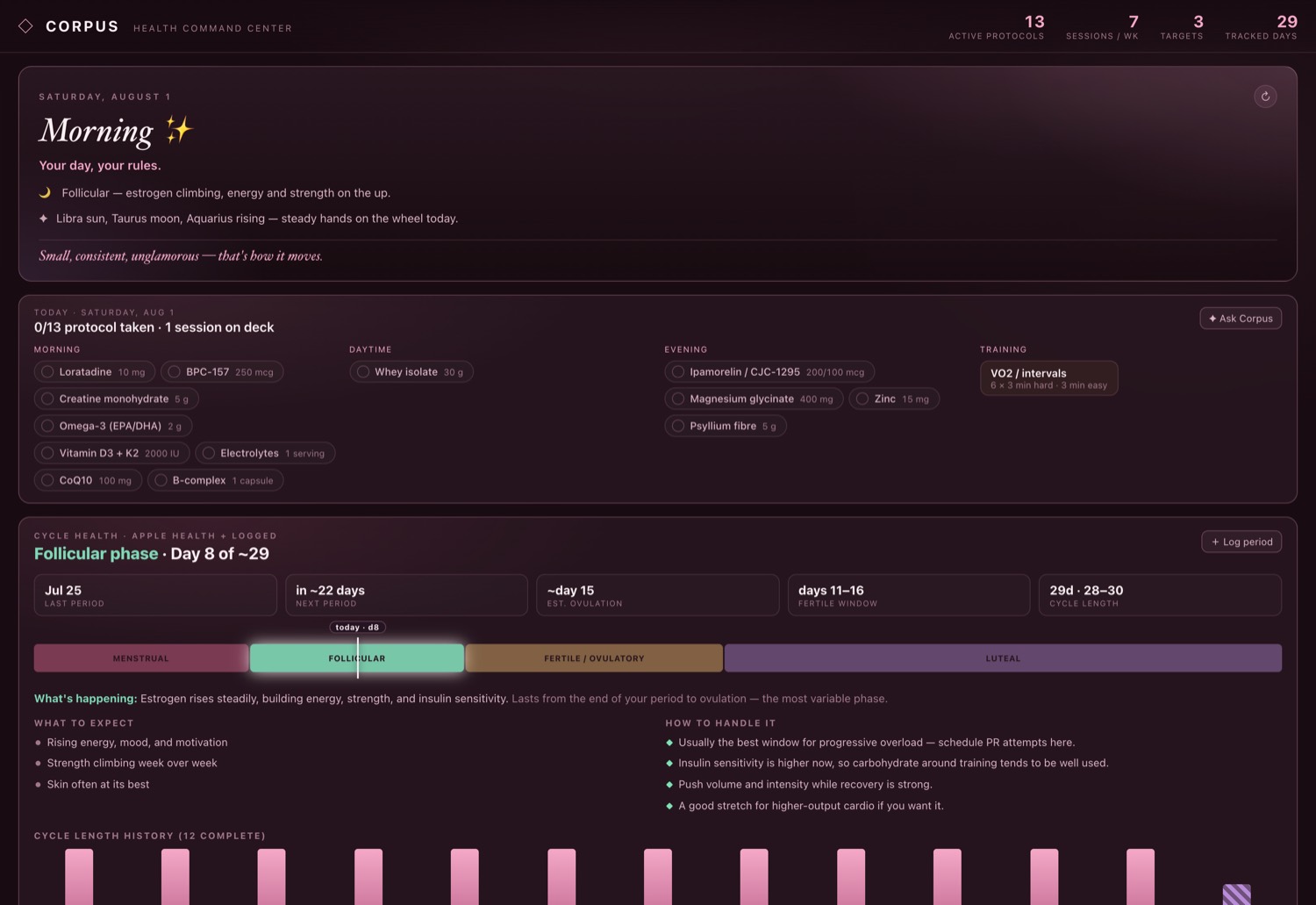
The Corpus dashboard: a daily briefing, today's protocol checklist, and the cycle health panel.
One window · everything you track Screenshots are the real app, running on demo data

01 — The body

See where your stack lands.

Every compound you enter is tagged with the systems it targets. Pick a system and the body highlights it — spine and nerve branches, a beating heart, translucent organs, a lit brain — while your stack, training and signals filter to match. Pick a compound instead and its systems light up on the body.

  • Coverage you can see. The number on each system chip is how many active compounds target it. Gaps are obvious because nothing lights up.
  • Two views. A realistic mesh, or a holographic wireframe. Drag to rotate; it also turns on its own.
  • Supplements, peptides, medications. Doses, timing, schedules and on/off cycles, each with the systems it acts on.
The protocol stack panel listing supplements and peptides with doses, timing and system dots.

02 — The read

Your own numbers, actually synthesized.

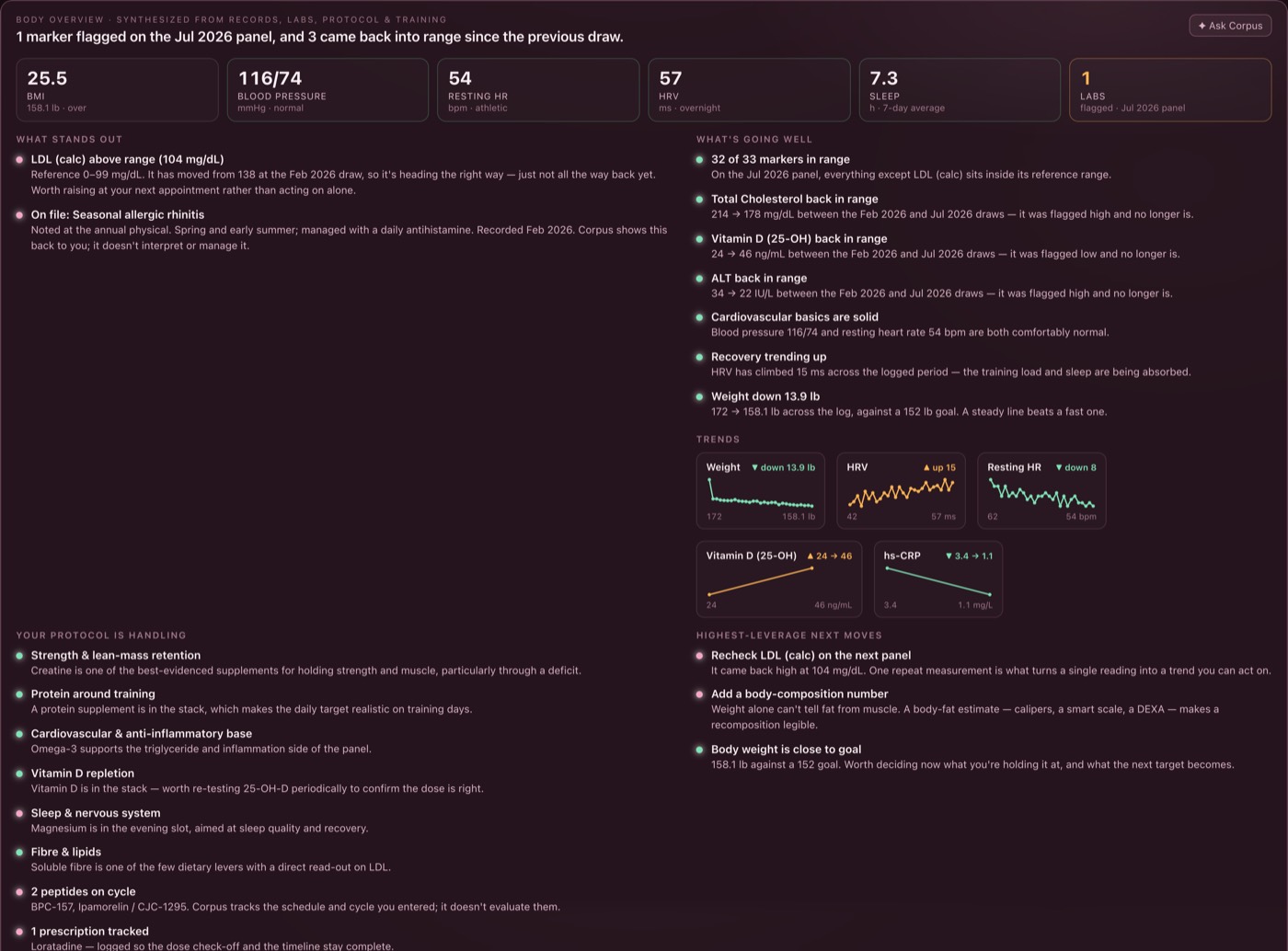
Corpus reads across your labs, conditions, protocol and training and writes back a plain-language overview: what stands out, what is going well, what your protocol is already handling, and the highest-leverage things left. Every line is derived from rows you entered — nothing is invented.

  • Labs with reference ranges. Out-of-range markers surface first; the full panel is one click away.
  • Trends, not snapshots. Weight, HRV, resting heart rate, vitamin D, hs-CRP — drawn between draws so movement is visible.
  • Observations, not advice. The panel is labelled that way on purpose. Corpus reflects your data back; it does not diagnose or dose.
The body overview panel: BMI, blood pressure, resting heart rate, HRV and sleep tiles above lists of standout findings and trend sparklines.

03 — Training

A blueprint that reads your own log.

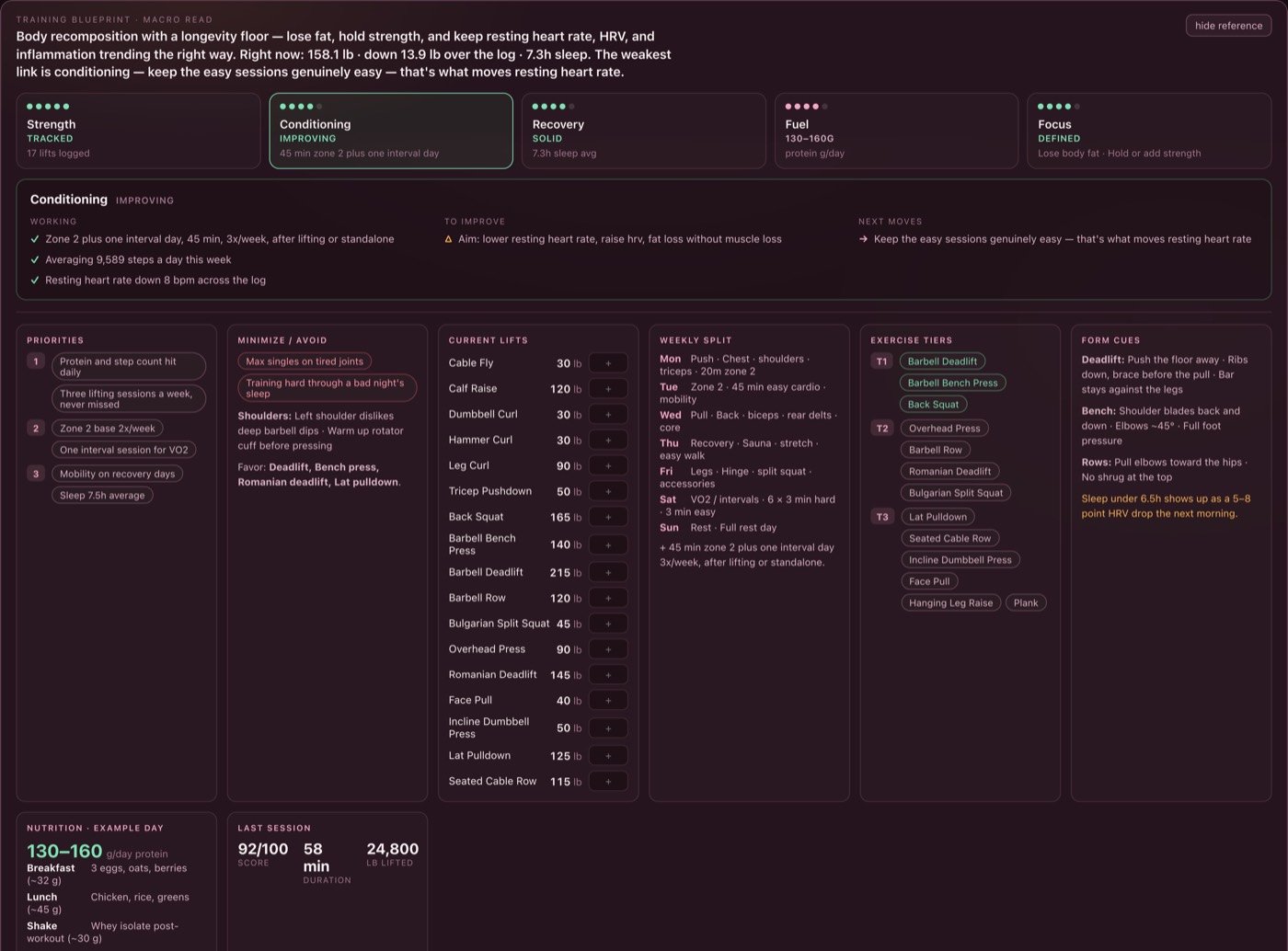
Corpus turns your lifts, sessions and metrics into a macro read of training — a one-line thesis and five pillars you can open for what is working, what to improve, and the next move. Below it, every logged session with its muscle focus, working weights and personal records.

  • Progressive overload, tracked. Current working weight per lift, tiered by priority, editable inline.
  • Your limits respected. Injuries, disliked movements and rules like "don't train hard on bad sleep" sit next to the plan.
  • Session history. Warm-ups, drop sets, skipped lifts and PRs — the ordinary texture of a real log.
The training blueprint panel showing a macro thesis, a conditioning pillar breakdown, current lifts, weekly split and form cues.

04 — The day

What to take, and when.

The protocol timeline lays out your week: a constant daily base plus the variable items — weekly shots, every-other-day peptides, workout-day fuel — mapped onto the days they actually land on. Today's doses are a checklist you tick off as you go.

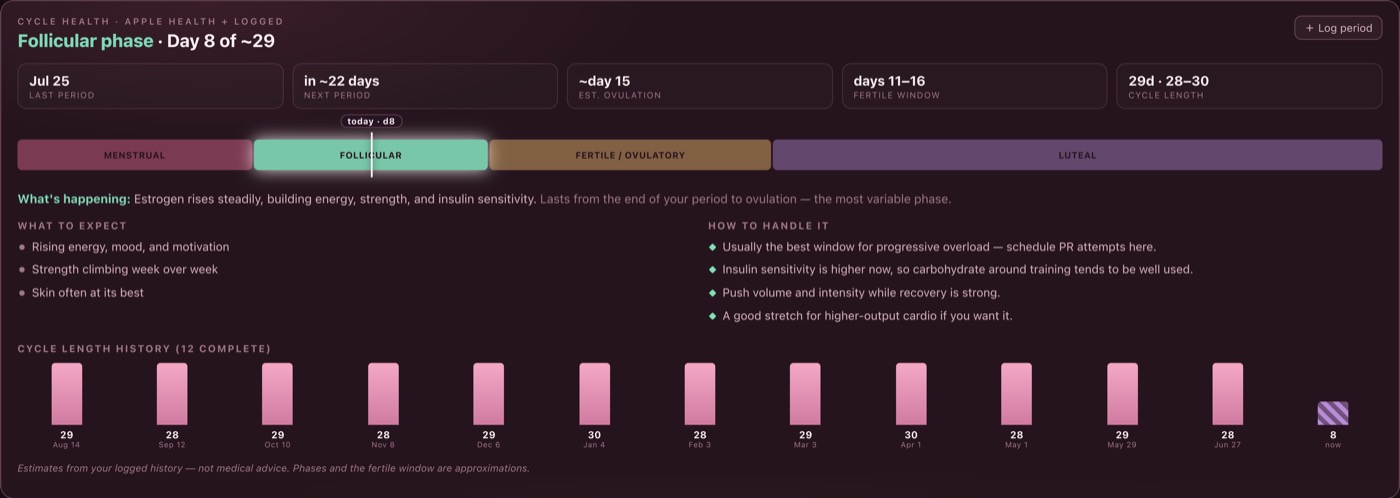
  • Cycle-aware. Optional cycle tracking derives your phase, fertile window and next-period estimate from logged starts alone.
  • Daily metrics. Sleep, HRV, resting heart rate, recovery, readiness, weight, mood and energy, with sparklines.
  • Device feeds. Oura, WHOOP, Fitbit and Apple Health write straight into that same table, using your own credentials. Manual entry still works for anything they don't cover.
The protocol timeline showing Monday to Sunday with each day's focus and the daily base of compounds.
The cycle health panel with phase bar, last and next period, ovulation estimate and fertile window.

05 — Your devices

Your tokens, your machine, no middleman.

Every other app that pulls your ring and your watch together does it by holding your credentials on their servers and your data alongside them. Corpus connects with credentials that belong to you, stored in your own database, and talks to each vendor directly from your computer. There is no Corpus server in the middle, because there is no Corpus server at all. The cost of that is real and worth stating up front: for Oura, WHOOP and Fitbit you register a free developer app in your own name first, and Corpus walks you through every field of it.

The honest caveat: a desktop app only syncs while it is running. Corpus pulls on launch and every four hours it stays open, and each connector backfills whatever it missed while you were away — these APIs are historical, so a laptop that was shut for a week catches the week up.

  • Oura

    Connects over OAuth to a free Oura application you register yourself. Fills sleep duration, HRV, resting heart rate, readiness and steps. If you still hold one of the personal access tokens Oura issued before December 2025, you can paste that instead and skip the app.

  • WHOOP

    The same pattern: a free developer app registered to you, so the tokens are yours. Fills recovery, HRV, resting heart rate and sleep duration.

  • Fitbit retiring Sept 2026

    Works today and pulls steps, sleep, resting heart rate, HRV, weight and body fat — but Google is turning the Fitbit Web API off in September 2026, and the replacement needs a Google Cloud project behind a privacy and security review, which doesn't fit an app where you are your own developer. Connect it to rescue your Fitbit history into your own database before the lights go out; don't count on it as an ongoing feed. Corpus says all of this on the card too.

  • Apple Health

    Apple has no cloud API, so nothing can fetch it for you and nobody who claims otherwise is telling the truth. Two real routes instead: drop in an export.zip for your whole history, and optionally let the Health Auto Export app post new readings to your machine.

Everything lands in one metrics table, next to anything you typed by hand.

The whole point

This is the most sensitive data you have. It should not leave.

One file. On your computer. Backed up next to itself, every day.

your machine
corpus/
  data/corpus.db ← everything you've entered
  data/backups/
    corpus-2026-08-01.db
    corpus-2026-07-31.db  …30 kept
Copy it to move machines. Delete it to erase everything. There is no other copy.
  • No account

    There is nothing to sign up for and no password to reset. You run the server, you open the page.

  • No telemetry

    Corpus makes no analytics calls, no crash reports, no phone-home. The only outbound request it can make is to Anthropic, and only if you supply your own API key for chat and the daily briefing.

  • Localhost by default

    The server binds to 127.0.0.1. Reaching it from your phone is one deliberate environment variable — health data shouldn't go on your network by accident.

  • Automatic daily backups

    A consistent snapshot on every boot and once a day after, kept 30 deep, right beside the database. Nothing to configure.

  • Source included

    TypeScript, React, Three.js, Express and SQLite — readable, commented, and yours to change. If Corpus ever stops being maintained, it keeps working.

Install

Download, double-click, done.

You need a Mac or a Windows PC, and Node — a free runtime made by the Node.js project. That is the whole list. There is no account to make, nothing to configure, and no command to type.

  1. Download and unzip

    Buying gets you a zip file. Double-click it and you have a folder called corpus. Keep it anywhere you like — Documents is a fine home. Everything Corpus is, and everything you put into it, lives in that folder.

  2. Install Node — once

    Go to nodejs.org, download the LTS version, and click through the installer. About a minute. If you already have Node 20.12 or newer, skip this step; the launcher checks and will tell you.

  3. Double-click Start Corpus

    Start Corpus.command on a Mac, Start Corpus.bat on Windows. It is inside the folder from step one.

    On a Mac, the first time only: right-click the file, choose Open, then Open again in the box that appears. macOS asks this once about anything downloaded from the internet. After that, a normal double-click works.

  4. Your browser opens

    Corpus asks one question: explore a complete demo profile, or start fresh and empty. Pick one and you are in.

    Leave the small text window open while you use Corpus — that window is Corpus running. Closing it stops the app; double-clicking again brings it back.

What to expect. The very first start takes a few minutes — it downloads the libraries Corpus is built on and builds the interface, once, with plenty of text scrolling past. Every start after that takes a few seconds.

Where your data goes. Into data/corpus.db inside that same folder, with daily snapshots beside it in data/backups/. Nothing is uploaded and nothing syncs. Copy the folder to move machines; delete it to erase everything.

Getting started

Two minutes, one decision.

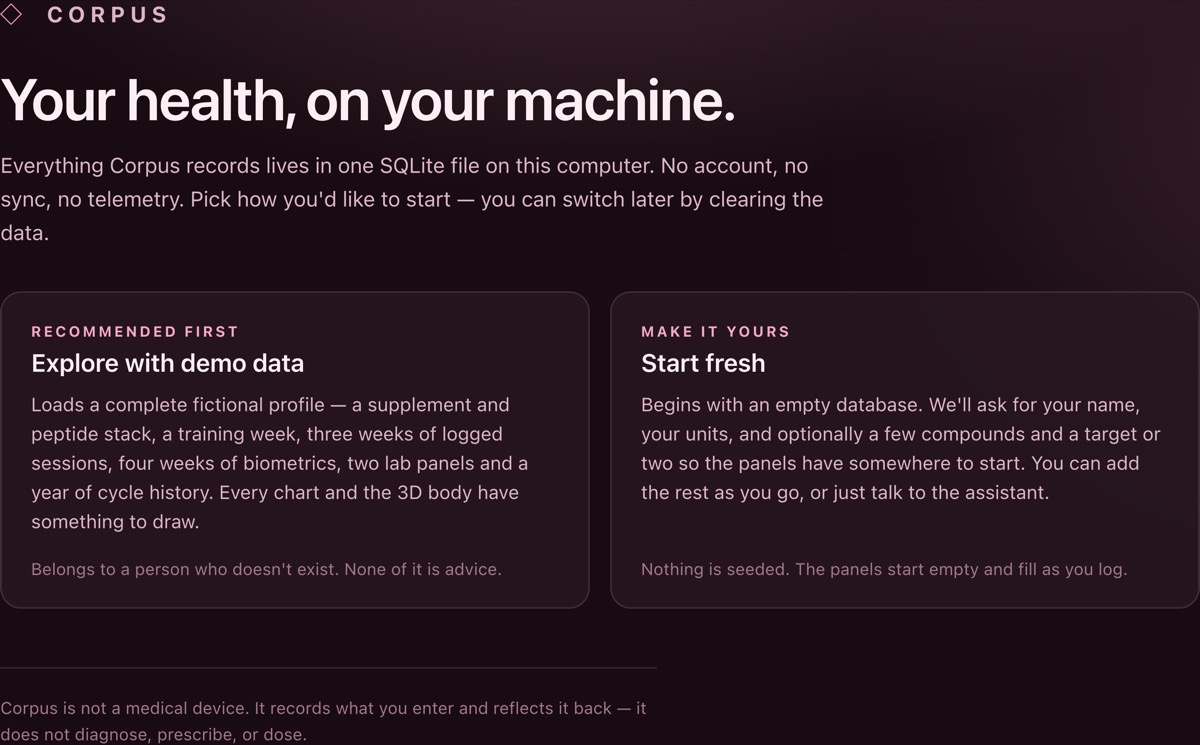
On first run Corpus asks how you'd like to begin. Explore a complete fictional profile — a stack, a training week, logged sessions, four weeks of biometrics, two lab panels and a year of cycle history — so every chart has something to draw. Or start fresh with an empty database and enter your own.

Chat and the daily briefing need your own Anthropic API key, which is stored only in your local .env. Everything else — the body, the stack, labs, training, metrics, cycle tracking, the signals — works without one.

The Corpus first-run screen offering two choices: explore with demo data, or start fresh.

Pricing

Buy it once.

$79
One time · yours forever
  • The complete Corpus source, ready to run
  • Every feature on this page — no tiers, nothing held back
  • Runs offline on your own machine, for as long as you keep the file
  • Single-user licence, for you and the machines you own
  • Updates for the current major version
Buy Corpus — $79

One payment. No subscription, no seats, no usage limits.

2-minute install · see how

Subscription health apps run $10–15 a month, which is $120–180 every year, forever, for software that keeps your data on someone else's servers. Corpus is $79 once and the data never leaves your computer.

Questions

Before you buy.

What do I need to run it?

A Mac or a Windows PC, and Node.js 20.12 or newer — a free runtime you install once from nodejs.org. Then you double-click Start Corpus and your browser opens. The full walk-through is in Install, four steps.

The 3D body needs a browser with WebGL, which every current browser has. Linux works too, from a terminal — see the README.

Do I have to pay for an API key?

Only if you want the chat assistant and the daily briefing. Those call Anthropic with a key you supply, billed to you at Anthropic's rates — a day of briefings and light chat is typically a few cents. Skip it and the rest of the app works normally; the briefing falls back to a written summary of your cycle phase.

Where does my data actually live?

In a single SQLite file at data/corpus.db, inside the folder you installed Corpus into. Daily snapshots go in data/backups/. You can open the file with any SQLite tool, copy it to another machine, or delete it to erase everything.

Can I use it on my phone?

Yes, on your own network. The server binds to localhost by default; setting CORPUS_HOST=0.0.0.0 exposes it to your LAN so you can open it from a phone on the same Wi-Fi. That is deliberately an opt-in — anyone on that network can then reach it, and this is health data.

What about updates?

You get updates for the current major version. Because you have the source and the data is a plain SQLite file, an update is replacing code next to a database that keeps its own shape — and nothing can be taken away from you if updates stop.

Is it a medical device?

No, and it is not trying to be. Corpus records what you enter and reflects it back: coverage, trends, reminders and observations from your own rows. It does not diagnose, prescribe, or tell you what to take. Bring anything it surfaces to your own clinician.

How do the device connectors actually work?

With credentials that belong to you. Oura, WHOOP and Fitbit use OAuth against a free developer app you register yourself — a few minutes each, and Corpus gives you the exact steps and the exact redirect URL to paste. (Oura used to offer a paste-a-token shortcut; it stopped issuing those in December 2025, and Corpus still accepts one if you already have it. Fitbit's API is being retired in September 2026, so treat it as a way to rescue your history rather than a lasting feed.) Apple Health has no cloud API at all, so you import an export.zip for history and optionally let the Health Auto Export iOS app post new readings to your machine. Nothing routes through a server of ours, and every token stays in your database.

Does it sync when Corpus isn't running?

No, and it can't — there is no always-on service to do it. Corpus syncs when it starts and every four hours it stays open. Because each connector resumes from its last successful sync and these vendor APIs are historical, nothing is lost: open Corpus after a week away and it fills the week in.

What's rough about it?

Fitbit is on borrowed time: Google turns off the Fitbit Web API in September 2026, and the replacement needs a Google Cloud project behind a privacy and security review, so Corpus will likely not be able to offer Fitbit after that. It's shipped, labelled, and still worth connecting once to pull your history in — but that is the honest shape of it. Oura, WHOOP and Fitbit each also need you to register your own free developer app before they will talk to anything — that is their rule, not ours, and it is a genuine few minutes of form-filling per device. The likeliest place to get stuck is the redirect URL: a local app needs a localhost callback, Fitbit's docs say HTTPS-only (its form accepts localhost in practice), and WHOOP documents only https:// and whoop:// shapes. There's a documented override if a form refuses it, but it means putting an HTTPS proxy in front of the local port, and that is a real afternoon. Connectors only sync while the app is open. It is a single-user app with no multi-profile support. And while there is a double-click launcher, it is not a signed, packaged installer: you install Node once yourself, and the first start builds the app in front of you.